After installing and activating the Dynamic Pricing & Discount Rules for WooCommerce plugin, you can start building flexible pricing and discount rules from the PluginBrew → Dynamic Pricing → Rules section. Click Create Rule to get started. 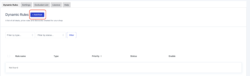
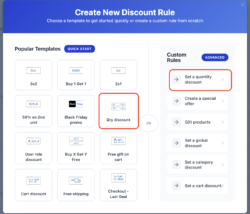
You can either create a rule from scratch or speed things up by selecting a predefined template designed for common promotional scenarios.

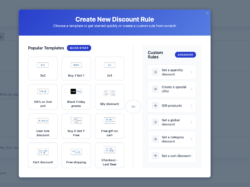

All created rules are listed in the main rules table, where you can enable or disable them, edit their settings, duplicate existing rules, or remove rules you no longer need. Built-in search and filters make it easy to manage complex setups. 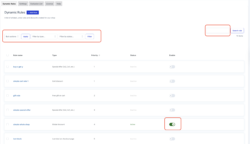

If you frequently reuse similar promotions, you can duplicate an existing rule and adjust only the necessary details, saving time and avoiding repetitive setup. 

Available Rule Types #
-
- Quantity-based discounts – reward customers for buying more
-
- Special offers – 3×2, 2×1, Buy X Get Y, and similar deals
-
- Gift products – add free items when conditions are met
-
- BOGO rules – Buy One Get One promotions
-
- Storewide discounts – apply discounts across the entire catalog
-
- Category-based discounts – target specific product groups
-
- Cart discounts – apply offers based on cart total or quantity
-
- Checkout deals – last-step incentives before purchase
Quantity Discount Rules #
Quantity discounts let you adjust pricing dynamically based on how many units a customer adds to the cart. This is ideal for volume pricing and “buy more, save more” strategies.
Note: Only one quantity discount rule can apply to a product at a time.
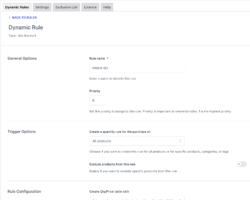
To create a quantity discount, add a new rule and choose the Quantity Discount template. Give the rule a clear name and define its priority to control how it interacts with other promotions.


Product Selection #
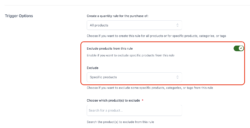
Choose whether the rule applies to all products, selected products, or specific categories or tags. You can also exclude certain products if needed.

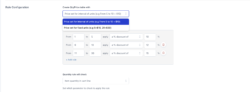
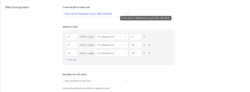
Discount Configuration #
Define quantity ranges and corresponding prices or discounts. You can configure rules using fixed quantities or quantity intervals, depending on your pricing strategy.
How Quantities Are Counted #
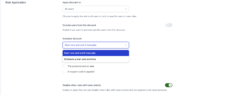
The plugin offers multiple ways to calculate quantities, including:
- Per cart line item
- Per product (variations grouped)
- Per variation (counted separately)
- Total quantity across the entire cart
This flexibility allows you to match real-world selling scenarios, whether you’re promoting bulk orders or encouraging product variety.
Rule Scheduling & Restrictions #
You can schedule rules to start and end automatically, exclude on-sale products, prevent stacking with coupons, or stop lower-priority rules from applying.
Frontend Display & Messaging #
To improve clarity and conversions, you can show discounted prices on shop pages, display quantity tables on product pages, and add custom messages that explain the offer.